What it is for
Debug Center is for servicing machines that belong to someone else: finding out why a computer is slow, reading the errors it logged, running a repair, pulling a file off it or pushing a fix onto it. Remote desktop tools are built around sharing a screen. For most of that work I want the machine’s facts and a command line, on Windows, Linux and macOS, and later on phones.
I also want the connection under my control. The coordination server is mine, there is no account with a remote access company, and nothing on the client’s machine listens on the internet or on their local network. The tool is open source under the MIT licence, and the code is public on my Forgejo, GitHub and Codeberg.
Repository on GitHub ↗Forgejo (canonical) ↗Codeberg mirror ↗
Two programs
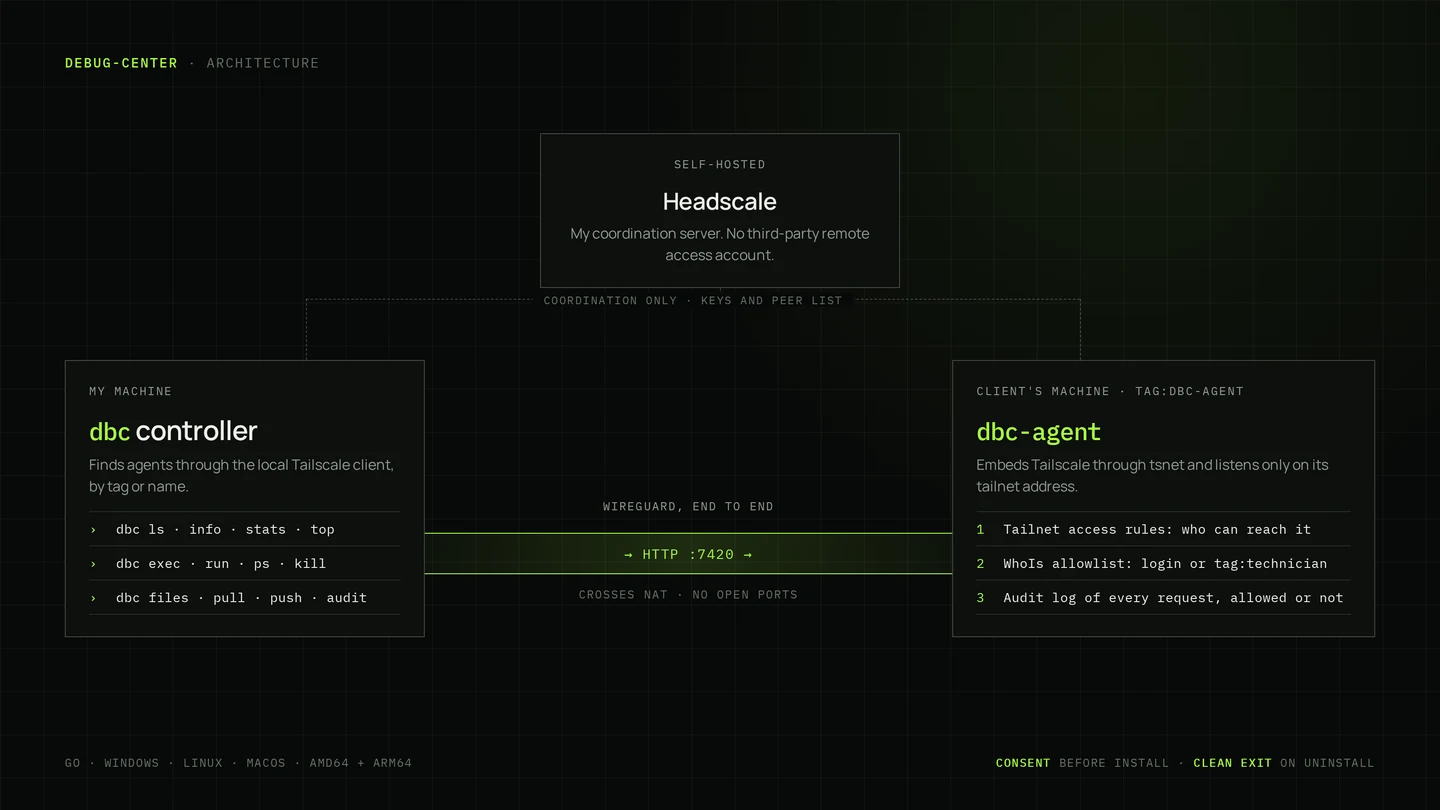
dbc-agent runs on the machine being serviced. dbc is the controller I run on mine. Both are written in Go and compile to a single file with no dependencies, for Windows, Linux and macOS on both amd64 and arm64. On Windows, double-clicking the agent starts its installer.
The agent has three modes. install sets it up as a system service that survives reboots. run starts a one-off session in the foreground: when the client presses Ctrl+C, it leaves the network and deletes everything it stored. uninstall removes it completely.
# On the client's machine: install as a service, or run once
dbc-agent install --name acme-desk --auth-key <key> --allow tag:technician
dbc-agent run --auth-key <key> --allow tag:technician

# On mine
dbc ls
dbc info acme-desk
dbc top acme-deskA private network without open ports
The agent embeds Tailscale through tsnet, so the client does not install Tailscale or anything else. On start it joins a tailnet coordinated by my own Headscale server, under a name that says whose machine it is: dbc-<name>-<id>, tagged tag:dbc-agent. Connections are encrypted end to end between the two machines and cross NAT on their own, so nothing has to be opened on the client’s router.
The agent listens only on its tailnet address. The controller asks the Tailscale client already running on my machine for its peers and picks out the agents by tag or name. That makes discovery free: dbc ls lists every agent with its operating system, whether it is online, and when it was last seen.
Who is allowed in
Two gates stand in front of every request. The first is the tailnet’s access rules, which decide who can reach an agent at all. The second is in the agent itself: it asks the network who is calling, and only answers identities on its allowlist, either a person’s tailnet login or a tag such as tag:technician. A tagged machine never matches on a login, because tagged nodes have no real user behind them.
Every request goes into an audit log on the machine, allowed or not, with who asked, from which node and what for. dbc audit reads it back, and the client can read it locally.
Consent, and leaving nothing behind
Before installing, the agent prints exactly what it is about to do: the service it registers and where, the network it joins and under which name, who will be able to control the machine and what they can do, and where the audit log lives. It needs administrator rights, and nothing happens until the owner types yes.
The pre-auth key that lets the agent join the network is a one-time credential. Once the installed agent has registered, it erases the key from its configuration. Removal works on the machine or from my side with dbc uninstall: the agent logs out of the tailnet, stops and removes its service and deletes its files. Removing it on the machine can keep a copy of the audit log for the owner.
What I can do once I am in
dbc info shows the hardware and software inventory. dbc stats takes one sample of CPU, memory, disk, network and temperatures, and dbc top keeps it live. dbc ps lists processes busiest first, and dbc kill ends them. dbc exec runs a command on the machine and streams its output back as it runs. dbc files, pull and push browse and move files.
Most repairs do not need a free-form command, so the agent carries a catalogue of named diagnostic and repair actions for its operating system: 28 on Windows, 14 on Linux and 5 on macOS so far. On Windows they include sfc and DISM scans and repairs, chkdsk, disk health, crash history, the reliability record, driver and device problems, battery and energy reports, a Defender quick scan, network reset and temp cleanup. Actions that disrupt the machine, such as a reboot, are marked as dangerous, and dbc asks before running them.
dbc actions acme-desk
dbc run acme-desk event-errors
dbc run acme-desk sfc-scan
dbc exec acme-desk ipconfig /all
dbc pull acme-desk 'C:\Windows\Logs\CBS\CBS.log'
dbc uninstall acme-deskBuilds and downloads
Every push to the repository is vetted, tested and built for all twelve binaries on my own Forgejo, and each run keeps them for download. Tagged versions are published as releases. The binary names carry no version, so each platform gets one stable link that always returns the newest agent, and that is what a client receives.
The agent can be built with the coordination server and the allowed technicians baked in, so the client does not have to type them. The public builds never contain a pre-auth key: anyone can download them, and a key inside would let anyone join the support network.
Where it stands
Both programs are written, about 4,500 lines of Go, and the controller has been run end to end against the agent’s real request handlers on my machine. Nothing is released yet, and neither has run against a real support tailnet. The first release needs a quick start and guides, field testing on Windows 10 and 11, common Linux distributions and macOS, tests for the security-sensitive code, and Windows code signing so that SmartScreen and antivirus software do not block the download.
Next: phones, then more of everything
Debug Center started as a PC tool and is growing to every kind of device, phones first. Android gets the same agent core as an app, running as a foreground service behind a visible consent screen. A phone plugged into a computer running the agent can also be serviced over USB through adb, which reaches deeper than an app can. iOS does not allow an app with this kind of access, so iPhones are serviced over USB from a computer running the agent, with libimobiledevice: device details, battery health, the system log, crash reports and backups.
- Time-limited installs, so an agent removes itself when nobody remembers to.
- A visible notice on the device while a technician is connected.
- Read-only roles next to full control.
- An interactive shell, screenshots and port forwarding to the client’s router or printer.
- A before-and-after report to hand the client at the end of a repair.